Free Cover Letter Layouts That Look Professional
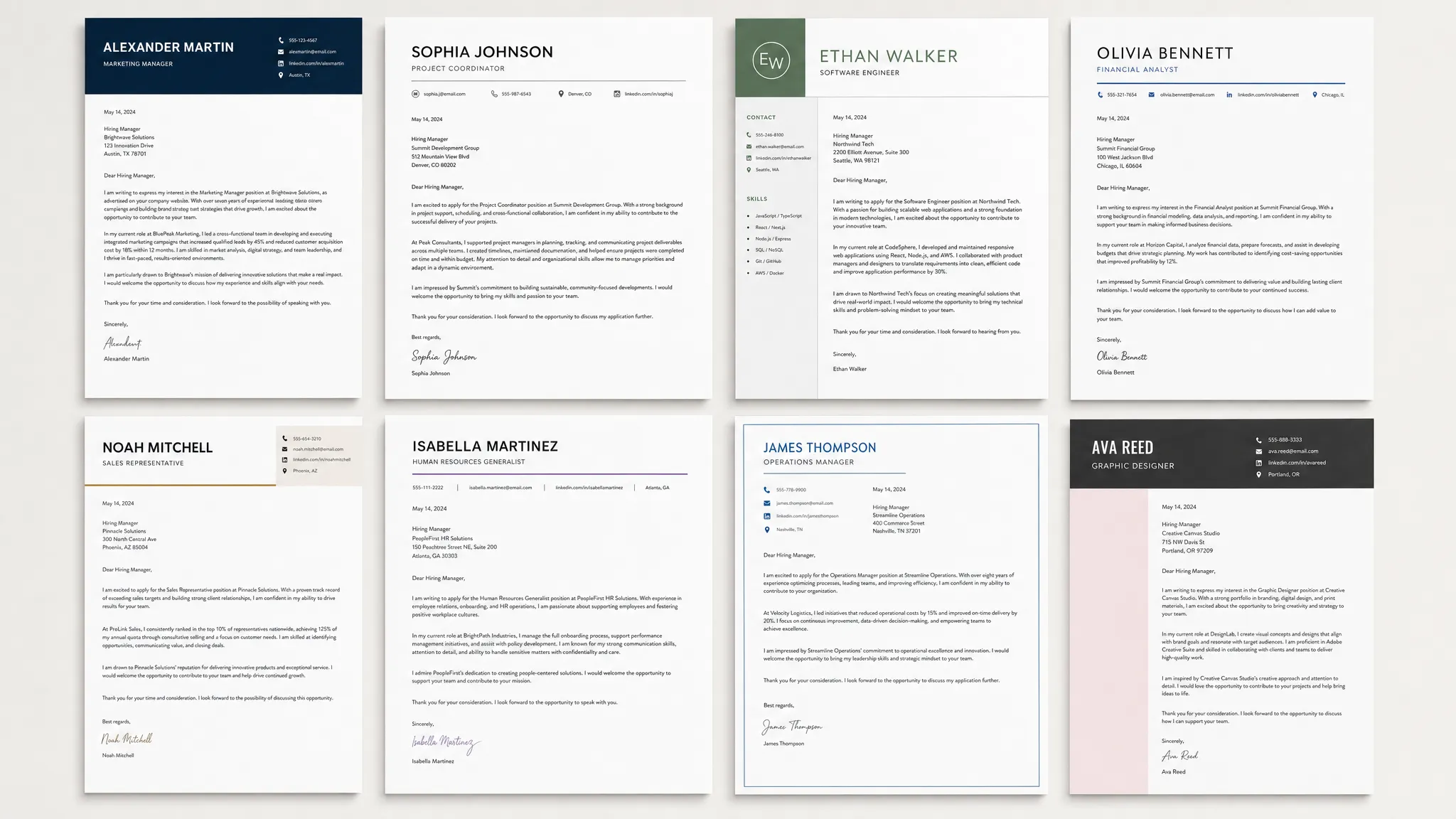
Use these free cover letter layouts to create a clean, professional application. Copy formats for email, career change, entry-level, and more.
Write your cover letter — not a blank template
Generate a finished cover letter with your details, tone, and language in ~30 seconds. Free first letter, no credit card — beats copy-pasting and filling the blanks yourself.
A professional cover letter layout does one job: it makes your message easy to read before the hiring manager decides whether to keep reading. The design should feel clean, organized, and intentional, not flashy or crowded.
The good news is that you do not need expensive design software to create one. A strong cover letter can use a simple, free layout with standard fonts, clear spacing, and a structure that quickly shows why you fit the role.
Below are several free cover letter layouts you can copy, adapt, and use for different job search situations, from traditional corporate applications to email cover letters and modern creative roles.
What Makes a Cover Letter Layout Look Professional?
A professional layout is not the same thing as a decorative template. In most hiring situations, the best layout is the one that helps the reader find the key information fast: who you are, what role you want, why you are qualified, and how to contact you.
According to Purdue OWL's guidance on business letters, formal letters should prioritize clarity, standard structure, and readable formatting. That principle applies directly to cover letters.
Use these baseline rules before choosing any layout:
| Layout element | Professional standard | Why it matters |
|---|---|---|
| Length | One page | Keeps the letter focused and easy to scan |
| Margins | 0.75 to 1 inch | Prevents the page from looking crowded |
| Font size | 10.5 to 12 pt | Maintains readability across devices |
| Font style | Arial, Calibri, Aptos, Times New Roman, or Georgia | Looks clean and works well in PDFs |
| Alignment | Left-aligned | Easier to read than centered body text |
| Paragraphs | 3 to 4 short paragraphs | Helps hiring managers skim quickly |
| File format | PDF unless the employer asks otherwise | Preserves spacing and layout |
A free cover letter layout should also be ATS-friendly. While applicant tracking systems are more often used to parse resumes, cover letters may still be uploaded, copied into forms, or stored alongside application materials. Avoid complex columns, text boxes, unusual icons, and image-heavy designs unless you are submitting a separate portfolio-style document.
Layout 1: Classic Business Cover Letter Layout
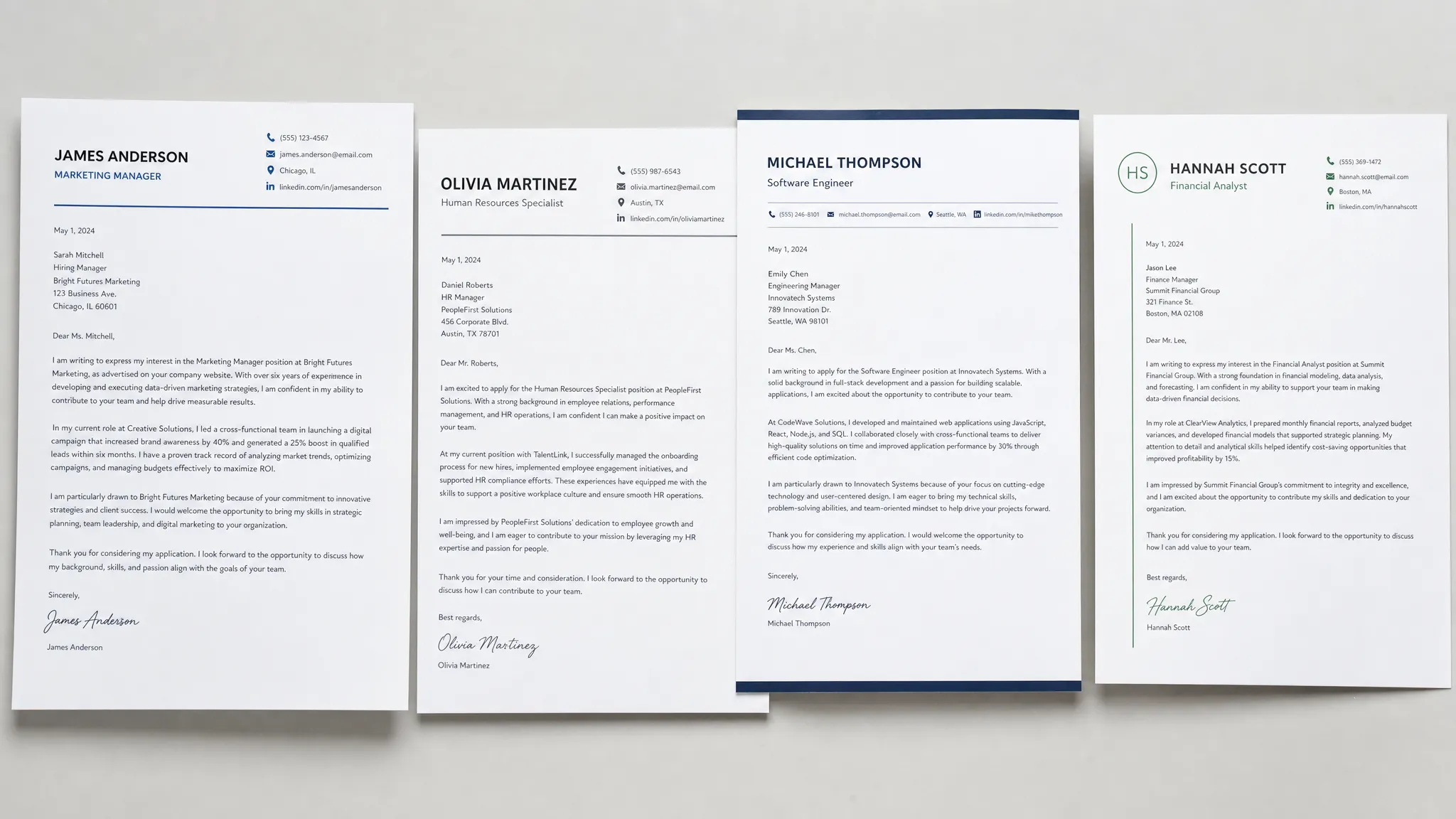
Best for: corporate roles, finance, administration, healthcare, education, government, legal, and traditional industries.
The classic business layout is the safest option for most applications. It uses a formal letter structure with your contact information at the top, followed by the date, employer details, greeting, body, and signature.
This layout works because it looks familiar. Hiring managers do not have to figure out where anything is. It also prints well and converts cleanly to PDF.
[Your Name]
[Your Phone Number]
[Your Email Address]
[City, State]
[LinkedIn or Portfolio, optional]

[Date]

[Hiring Manager Name]
[Company Name]
[Company Address, optional]
[City, State]

Dear [Hiring Manager Name],

[Opening paragraph: Name the role and give one specific reason you are a strong fit.]

[Middle paragraph: Show 1 to 2 achievements that match the job description. Use numbers or concrete outcomes when possible.]

[Closing paragraph: Reconnect your experience to the company, express interest in an interview, and thank the reader.]

Sincerely,
[Your Name]
When to Use This Layout
Use the classic layout when the job posting feels formal, the company is large or established, or the application asks for a cover letter attachment. It is also a smart default when you are unsure what style the employer expects.
The main risk is sounding too generic. The layout is professional, but the writing still needs to be specific. Replace broad phrases like “I am a hardworking professional” with proof, such as “I reduced weekly reporting time by 30% by automating recurring spreadsheet tasks.”
Layout 2: Modern Header Cover Letter Layout
Best for: technology, marketing, operations, startups, product roles, customer success, and modern corporate roles.
The modern header layout keeps the same professional structure but gives your name and contact details a cleaner, more resume-like presentation. It feels polished without becoming overdesigned.
[YOUR NAME]
[Phone] | [Email] | [City, State] | [LinkedIn/Portfolio]

[Date]

Dear [Hiring Manager Name],

I am excited to apply for the [Job Title] role at [Company]. With experience in [relevant skill area] and a track record of [specific result], I can help your team [company or role goal].

In my recent role at [Previous Company], I [describe achievement]. This required [skill 1], [skill 2], and [skill 3], which align closely with your need for [job posting requirement].

What draws me to [Company] is [specific company detail]. I would welcome the opportunity to discuss how my background in [area] can support your team.

Best regards,
[Your Name]
Why This Layout Looks Professional
The modern header layout gives your letter visual balance. Your name is easy to spot, and your contact details are not buried in multiple lines. It pairs especially well with a resume that uses the same header style.
To keep it professional, do not use too many colors. One subtle accent color can work for creative or tech roles, but black text on a white background remains the safest choice. If you use a colored header, make sure the letter is still readable when printed in grayscale.
Layout 3: Short Email Cover Letter Layout
Best for: applying by email, networking follow-ups, recruiter messages, referrals, and situations where the employer asks you to paste your letter into a form.
Email cover letters should be shorter than attachment-style letters. The reader is already in an inbox, so the layout should get to the point quickly.
Subject: Application for [Job Title] - [Your Name]

Dear [Hiring Manager Name],

I am applying for the [Job Title] role at [Company]. My background in [relevant area] matches your need for [specific job requirement], especially my experience [brief proof point].

In my current role, I [specific achievement or responsibility with result]. I would be excited to bring the same focus on [relevant value] to your team.

I have attached my resume for your review. Thank you for your time, and I would welcome the opportunity to discuss my fit for the role.

Best,
[Your Name]
[Phone]
[LinkedIn or Portfolio, optional]
Email Layout Tips
An email cover letter should usually be 120 to 200 words. Keep paragraphs to 2 or 3 lines so the message reads well on mobile. Use a clear subject line and avoid adding a full postal address unless the employer specifically requests a formal letter.
If you attach a resume and cover letter, name your files clearly. For example: Jordan-Lee-Cover-Letter.pdf and Jordan-Lee-Resume.pdf.
Layout 4: Achievement-First Cover Letter Layout
Best for: experienced professionals, sales roles, marketing roles, operations, project management, and applicants with measurable wins.
This layout starts with your strongest result instead of a general introduction. It is useful when you want the hiring manager to notice your impact immediately.
[Your Name]
[Phone] | [Email] | [City, State] | [LinkedIn]

[Date]

Dear [Hiring Manager Name],

At [Previous Company], I [specific achievement with number, result, or scope]. I am applying for the [Job Title] role at [Company] because your team needs someone who can [job requirement or business goal].

My experience includes [skill or responsibility], [skill or responsibility], and [skill or responsibility]. For example, I [second proof point that connects directly to the job posting].

I am especially interested in [Company] because [specific reason]. I would appreciate the opportunity to discuss how my background can help your team [desired result].

Sincerely,
[Your Name]
How to Make This Layout Work
This layout depends on strong evidence. If the first sentence is vague, the layout loses its power. Lead with a specific result, such as revenue growth, time saved, customer satisfaction improvement, cost reduction, campaign performance, process improvement, or team leadership.
Here are examples of strong opening lines:
- I increased qualified demo bookings by 42% in six months by rebuilding our outbound email sequence and lead scoring process.
- I helped reduce patient intake delays by 25% by redesigning the front-desk scheduling workflow.
- I managed a 12-person support team that improved first-response time from 9 hours to under 3 hours.
Use this layout when your experience clearly matches the job. If you are changing careers or applying for an entry-level role, the next layouts may be a better fit.
Layout 5: Career Change Cover Letter Layout
Best for: career changers, industry switchers, return-to-work applicants, and people whose resume needs context.
A career change cover letter layout should not hide the transition. Instead, it should make the connection clear between your past experience and the target role.
[Your Name]
[Phone] | [Email] | [City, State] | [LinkedIn]

[Date]

Dear [Hiring Manager Name],

I am applying for the [Job Title] role at [Company] after building experience in [previous field]. While my background is in [previous area], my work has consistently focused on [transferable skill], [transferable skill], and [transferable skill].

In my previous role, I [achievement that proves a transferable ability]. This experience prepared me to [connect directly to the target role's responsibility].

I have also strengthened my fit for this transition by [course, certification, project, volunteer work, portfolio, or independent learning]. I am excited about [Company] because [specific reason tied to the role].

Thank you for your consideration. I would welcome the chance to discuss how my experience and preparation can contribute to your team.

Sincerely,
[Your Name]
Why This Layout Helps
Hiring managers may have questions when your resume does not follow a straight path. This layout answers those questions before they become objections. It gives your transition a logical explanation and highlights relevant skills instead of apologizing for a nontraditional background.
Keep the tone confident. Do not write, “Although I do not have direct experience.” A stronger version is, “My background in client operations has prepared me to manage stakeholder communication, deadlines, and process improvement in this project coordinator role.”
Layout 6: Entry-Level or Student Cover Letter Layout
Best for: students, recent graduates, internships, apprenticeships, first jobs, and applicants with limited professional experience.
Entry-level applicants often make the mistake of focusing on what they hope to gain. A stronger layout focuses on what they can already contribute, even if that proof comes from coursework, projects, volunteering, campus work, or part-time jobs.
[Your Name]
[Phone] | [Email] | [City, State] | [LinkedIn/Portfolio, optional]

[Date]

Dear [Hiring Manager Name],

I am applying for the [Internship/Job Title] role at [Company]. Through my experience in [course/project/part-time role], I have developed skills in [skill], [skill], and [skill] that match your need for [job requirement].

For example, I [describe a class project, volunteer role, campus leadership example, or part-time job achievement]. This taught me how to [relevant ability] while [working with a team, meeting deadlines, serving customers, analyzing data, etc.].

I am drawn to [Company] because [specific reason]. I would be grateful for the opportunity to contribute my [strength] and continue developing in [field or role area].

Sincerely,
[Your Name]
What to Include If You Have Limited Experience
You do not need years of employment to write a credible cover letter. Use evidence from real situations where you solved a problem, met a deadline, supported people, learned a tool, completed a project, or took responsibility.
Good entry-level proof can include academic projects, student leadership, customer service jobs, volunteer work, freelance projects, certifications, competitions, internships, and portfolio work.
Which Free Cover Letter Layout Should You Choose?
The best layout depends on the employer, the role, and the story your application needs to tell. If you are not sure, use the classic business layout or modern header layout. Both are versatile and professional.
| Situation | Best layout | Why it works |
|---|---|---|
| Traditional company or formal industry | Classic business layout | Looks polished, familiar, and safe |
| Tech, marketing, startup, or modern office role | Modern header layout | Feels current without sacrificing readability |
| Applying directly by email | Short email layout | Keeps the message concise and mobile-friendly |
| You have strong measurable results | Achievement-first layout | Puts proof at the top of the page |
| You are changing careers | Career change layout | Explains your transition clearly and confidently |
| You are a student or recent graduate | Entry-level layout | Turns projects and early experience into relevant proof |
If the job posting gives specific instructions, follow those first. A beautiful layout will not help if the employer asked for the cover letter in the body of an email and you only attached a PDF.
Cover Letter Layout Mistakes That Make Good Candidates Look Unprofessional
Even strong writing can be weakened by poor formatting. Before sending your letter, check for layout issues that distract from your qualifications.
Avoid these common mistakes:
- Using a two-column layout that looks nice but becomes hard to read when copied into an application system.
- Choosing tiny margins or small font sizes to squeeze in too much text.
- Centering the entire letter, which makes body paragraphs harder to scan.
- Using decorative fonts, icons, headshots, or heavy graphics for a standard job application.
- Sending a file with a vague name like
coverletterfinalfinal.pdfinstead of a professional file name. - Making the letter visually inconsistent with your resume if both are submitted together.
A professional layout should make the employer feel that you are organized, thoughtful, and easy to work with. If the formatting feels busy, simplify it.
Quick Formatting Checklist Before You Send
Use this final review to make sure your cover letter layout is ready:
| Check | What to confirm |
|---|---|
| Contact details | Your phone number and email are correct |
| Greeting | The hiring manager's name is spelled correctly, if used |
| Spacing | Paragraphs are separated consistently |
| Length | The letter fits on one page or stays concise in email format |
| Font | The font is readable and consistent with your resume |
| Proof | The letter includes at least one specific achievement or example |
| File name | The PDF has a clear professional name |
| Instructions | The layout matches what the job posting requested |
If you want more help with the wording itself, this guide pairs well with our practical checklist for writing a cover letter for a job and our collection of free cover letter samples by industry.
Frequently Asked Questions
What is the best free cover letter layout? The best free cover letter layout for most job applications is a classic one-page, left-aligned business layout with your contact information, the date, employer details, greeting, 3 short paragraphs, and a professional sign-off.
Should my cover letter layout match my resume? Yes, if possible. Use the same name header, font style, and general spacing so your resume and cover letter feel like one application package. They do not need to be identical, but they should look consistent.
Can I use a creative cover letter layout? You can use a more creative layout for design, media, or brand-focused roles, but keep it readable. Avoid designs that rely on images, complex columns, or decorative text if the letter will be uploaded into an application portal.
Is a cover letter layout more important than the writing? No. Layout helps your letter look professional, but the content determines whether it is persuasive. A clean layout with generic writing will still feel weak. Use the layout to support specific, role-focused evidence.
Should I send my cover letter as a PDF or Word document? PDF is usually best because it preserves your layout. However, always follow the employer's instructions. If the application asks for a Word document or plain text, use that format.
Create a Polished Cover Letter Faster
A free layout gives you the structure, but the hardest part is often filling it with the right words for a specific job.
With LetterCraft AI, you can generate a professional, personalized cover letter in under 30 seconds. Choose the letter type, add a few details, select the tone you want, and get a ready-to-edit draft you can copy, export as a PDF, or save in your letter history.
LetterCraft AI supports 65+ letter types, multiple tone options, and 5 languages. It is free to try, with no credit card required, so you can move from a blank page to a professional cover letter layout and draft much faster.
Write your cover letter — not a blank template
Generate a finished cover letter with your details, tone, and language in ~30 seconds. Free first letter, no credit card — beats copy-pasting and filling the blanks yourself.