Cover Letter Format: The Simple Layout Hiring Managers Expect
Cover letter format made simple: the exact layout, spacing, and email rules hiring managers expect, plus a ready-to-copy template and checklist.
Write your cover letter — not a blank template
Generate a finished cover letter with your details, tone, and language in ~30 seconds. Free first letter, no credit card — beats copy-pasting and filling the blanks yourself.
A strong cover letter is easy to spot before anyone reads a single sentence.
Hiring managers expect a clean, familiar cover letter format that makes it effortless to find four things fast: who you are, what you’re applying for, why you’re a fit, and what you want them to do next (usually, schedule an interview). If your layout is cluttered, inconsistent, or overly creative, you create friction and the content has to work harder.
This guide gives you the simple layout most hiring teams expect, plus exact spacing, email rules, and a copy-ready template you can adapt in minutes.
What “good cover letter format” really means in 2026
When employers say they want a “professional” cover letter, they usually mean:
- Standard business-letter layout (easy to skim, no surprises)
- One page (typically 250 to 400 words for most roles)
- Three to four short paragraphs (not a wall of text)
- Consistent typography that matches your resume
- Clear targeting (company name, role title, a specific hook)
If you want a conservative, widely accepted baseline, the business-letter conventions outlined by resources like the Purdue OWL cover letter guidance are a solid reference point.
The simple layout hiring managers expect (block format)
The most “expected” format is left-aligned block style, with single spacing inside paragraphs and a blank line between sections.
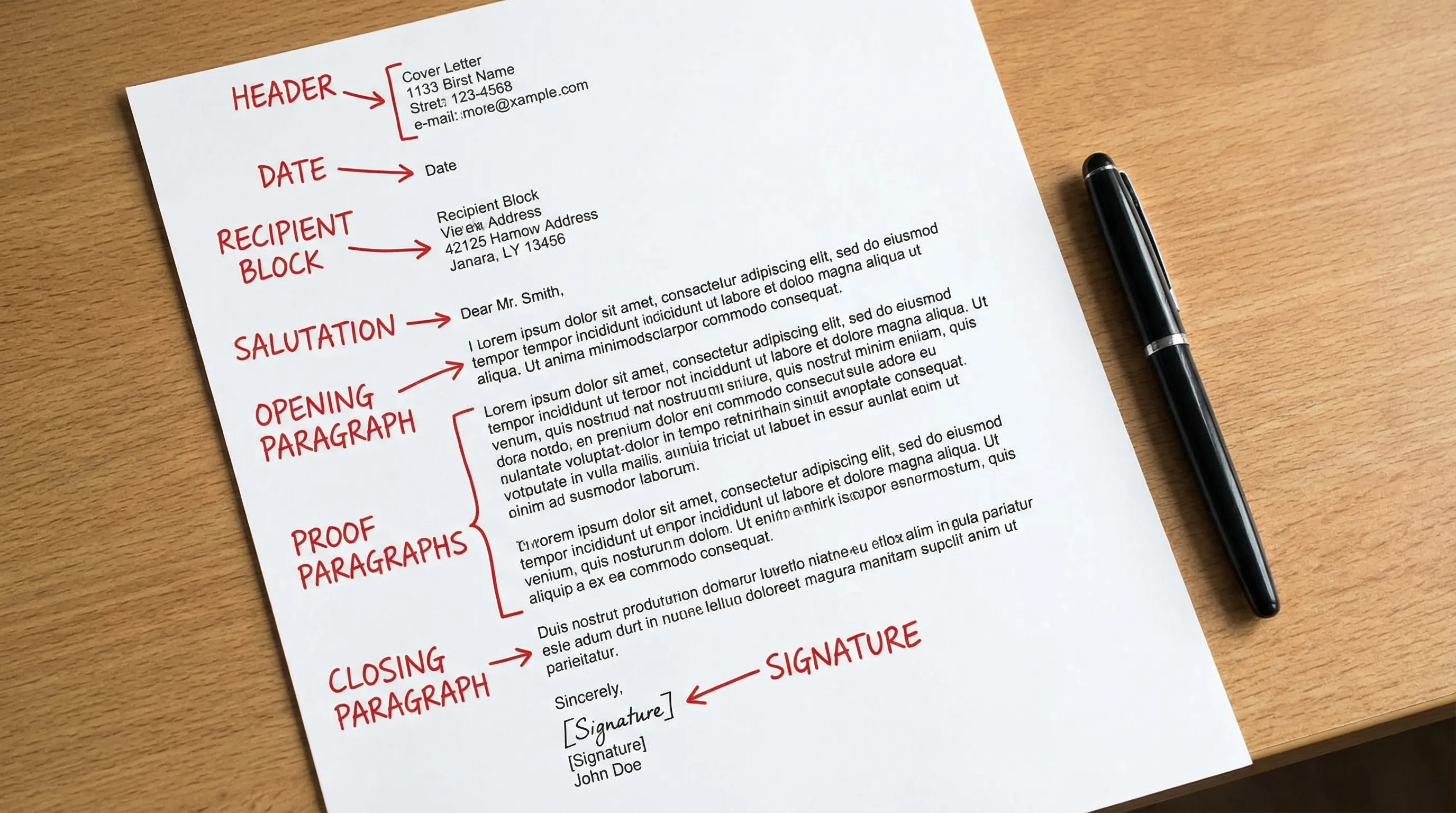
1) Header (your contact info)
Put this at the top, aligned left (or use the exact header style from your resume).
Include:
- Full name
- Phone number
- Professional email
- City, State (full address is optional)
- LinkedIn (optional, but helpful)
- Portfolio or GitHub (if relevant)
2) Date
One line, under your contact info.
3) Recipient details (when you have them)
This is the employer block. If you know the hiring manager’s name, use it.
Include:
- Hiring manager name (preferred)
- Title (optional)
- Company name
- Company location (city/state)
If you do not have a name, you can use a role-based alternative like “Hiring Manager” or “Hiring Team.” Avoid “To Whom It May Concern” unless you truly have no other option.
4) Salutation
Use:
- Dear Ms. Rivera,
- Dear Jordan Rivera, (safe if you are unsure of title)
- Dear Hiring Manager, (fallback)
5) Opening paragraph (the hook)
2 to 4 sentences.
What belongs here:
- The exact role title
- A precise reason you’re reaching out
- One high-signal detail (a relevant achievement, specialization, or connection)
6) Middle paragraph(s) (proof)
This is where most cover letters fail on format and structure.
Keep it to one or two short paragraphs. Each paragraph should do one job:
- Paragraph 2: your most relevant proof (impact, metrics, outcomes)
- Paragraph 3 (optional): your fit for this company (why them, why now)
7) Closing paragraph (clear next step)
2 to 3 sentences.
Include:
- A confident close (not “I hope”)
- A direct call to action (interview / conversation)
- A quick thank you
8) Sign-off + signature
Use a standard sign-off:
- Sincerely,
- Best regards,
Then your name. If sending as a document, you can leave a little space for a typed signature (not required).
9) Optional: enclosure line
If you are mailing or attaching multiple documents, you can add:
- Enclosure: Resume
- Attachments: Resume, Portfolio
This is optional for email, where attachments are obvious.
Cover letter format template (copy and paste)
Use this as a starting point and customize the content.
[Your Full Name]
[Phone] | [Email] | [City, State] | [LinkedIn or Portfolio]

[Month Day, Year]

[Hiring Manager Name]
[Title, if known]
[Company Name]
[City, State]

Dear [Name/Hiring Manager],

I’m applying for the [Job Title] role at [Company]. With [X years / X projects] in [relevant area], I’ve delivered [specific outcome], including [metric or measurable result]. I’m excited about this opportunity because [company-specific reason].

In my recent role at [Company/Project], I [did relevant work] and achieved [result]. Specifically, I [action] which led to [impact]. This maps directly to your need for [job requirement], especially around [priority from the job description].

What stands out to me about [Company] is [specific detail: product, mission, team, recent news]. I’d welcome the chance to discuss how I can help you [business goal or team outcome] in the first [30/60/90] days.

Sincerely,
[Your Name]
[Optional: Attachment/Enclosure line]
The formatting rules (margins, font, spacing) that keep you “safe”
You do not need fancy design to look modern. You need consistency and readability.
Page margins
Use 1-inch margins if possible.
If you are tight on space, 0.75-inch margins can still look professional. Avoid going smaller than 0.5-inch, which often looks cramped.
Font choice and size
Choose one readable font and stick to it.
Common safe options:
- Calibri
- Arial
- Helvetica
- Georgia
- Times New Roman (still acceptable, but can feel dated)
Font size: 10.5 to 12 pt is the usual range.
Line spacing
- Keep paragraphs single-spaced.
- Add one blank line between sections and between paragraphs.
Alignment
Left-align the whole letter. Centered text and full justification tend to reduce readability.
Length
Aim for one page.
A practical target for most applicants is 250 to 400 words, depending on seniority and how much context you need (career change and leadership roles sometimes run slightly longer).
Email cover letter format (different rules, same structure)
Many applications never see a “cover letter PDF.” They see an email.
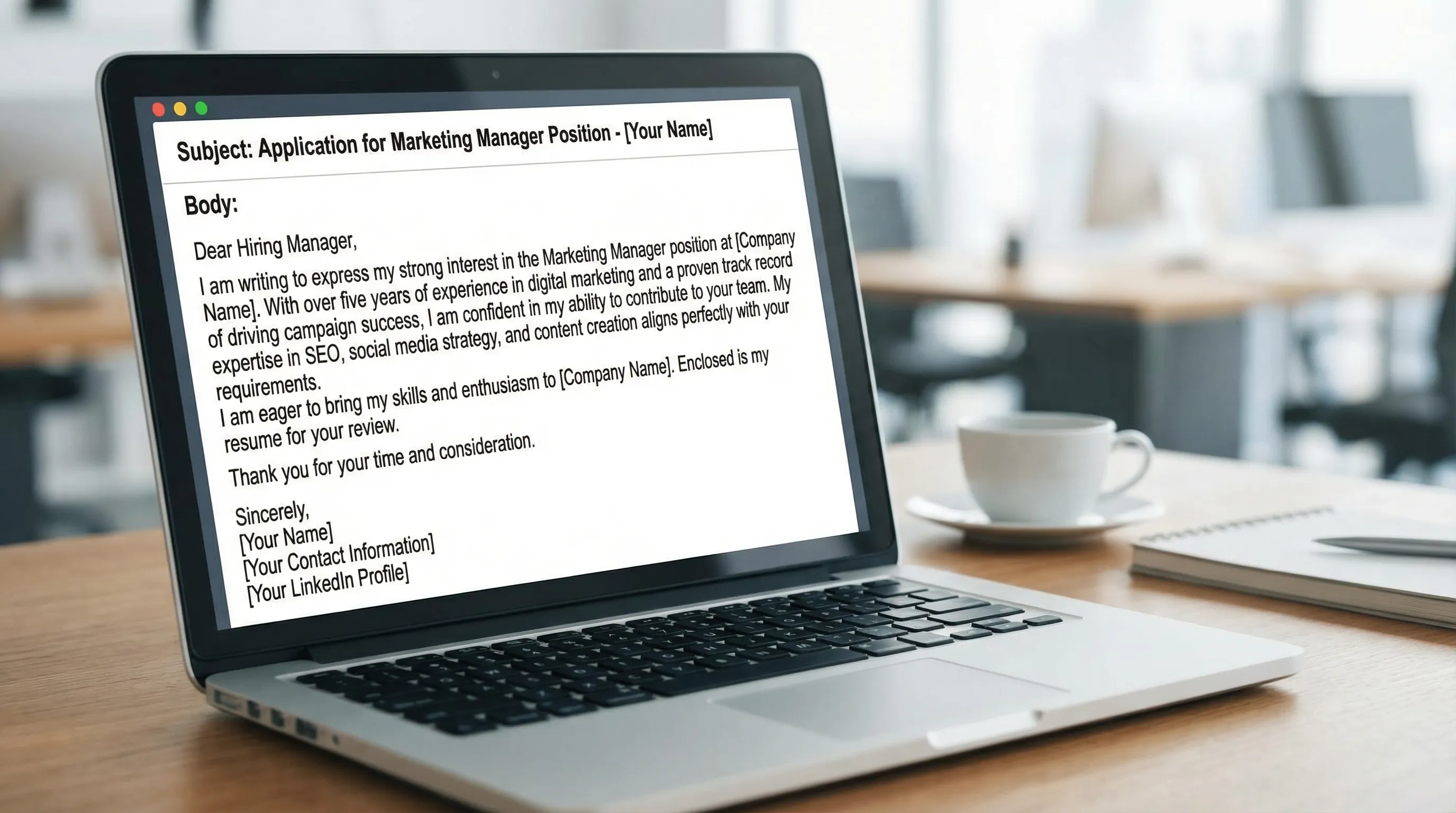
Your email cover letter should be shorter and more direct, while preserving the same sections: greeting, hook, proof, close, signature.
Email subject line
Use a clear subject line with the role title:
- Application: Marketing Manager, Jordan Lee
- Cover Letter: Data Analyst (Ref: 1842), Jordan Lee
Email body format
Keep paragraphs short (2 to 4 lines). Hiring managers are often reading on mobile.
Include:
- Greeting
- 2 to 3 short paragraphs
- Signature block with phone and LinkedIn
Attachments and file naming
If you attach documents, use clean filenames:
Jordan_Lee_Resume.pdfJordan_Lee_Cover_Letter_Product_Manager.pdf
Avoid:
resumeFINAL(3).pdfcoverletterupdatedreallyfinal.pdf
ATS-friendly formatting (what to avoid)
Even if a human reads your cover letter first, your application may still pass through an ATS or recruiting platform.
To reduce formatting issues:
- Avoid text boxes, columns, and heavy design elements in your cover letter document.
- Avoid graphics (icons, logos, headshots).
- Use standard section spacing (blank lines, not elaborate styling).
- If you include a link (portfolio, LinkedIn), keep it as a normal hyperlink.
If you are submitting through a portal that asks you to paste your cover letter into a text box, paste a plain-text version (no special indentation). Then review the preview carefully.
A quick reference table: sections and what each is for
| Section | What it includes | Why it matters to the reader |
|---|---|---|
| Header | Name, phone, email, location, links | Makes it easy to contact you and verify identity fast |
| Date + recipient block | Date, hiring manager, company | Signals professionalism and targeting |
| Salutation | “Dear Name” | Sets a respectful tone and shows effort |
| Opening | Role, hook, top qualification | Answers “who is this and why should I read?” |
| Proof paragraph(s) | 1 to 3 achievements tied to requirements | Shows fit with evidence, not claims |
| Closing | Interest, call to action, thanks | Creates momentum toward an interview |
| Signature | Name + contact | Clean finish and easy follow-up |
Common cover letter formatting mistakes (and the quick fix)
Mistake: your letter looks like an essay
If your paragraphs run 7 to 10 lines long, a hiring manager will skim or skip.
Fix: break it into three to four paragraphs, each with one job.
Mistake: you use a generic greeting with no attempt to find a name
“Dear Sir/Madam” makes you sound disconnected from the role.
Fix: try to identify the right person via the company site or LinkedIn. If you cannot, “Dear Hiring Manager” is better than outdated phrasing.
Mistake: inconsistent fonts between resume and cover letter
This can look messy, even if your writing is strong.
Fix: reuse your resume font and header style.
Mistake: you over-format (bold everywhere, multiple colors, unusual spacing)
Cover letters are not design portfolios.
Fix: keep formatting minimal. Let content carry the message.
Mistake: you include full home address when it is not needed
In many US contexts, a full street address is optional and can raise privacy concerns.
Fix: use City, State unless the employer specifically requests a full address.
Pre-send checklist (60 seconds)
Before you hit submit, scan for these “format signals” that hiring teams notice immediately:
- Header matches your resume (name, email, phone are correct)
- Company name and role title are correct (no leftover details from another application)
- Greeting uses a real name when possible
- Paragraphs are short and separated by a blank line
- Letter is one page and easy to skim
- File name is professional and includes your name
- Links work (LinkedIn, portfolio)
Want the format done for you in under 30 seconds?
If formatting is the part that slows you down (or you keep second-guessing tone), CraftMyLetter can generate a polished letter from a few details and keep the structure clean.
You can:
- Choose from 65+ letter types, including cover letters
- Pick tone options (helpful for conservative industries vs. startups)
- Export as PDF
- Copy to clipboard and reuse past drafts with letter history tracking
- Write in 5 languages
If you already have a resume and job description, a good workflow is:
- Generate a structured draft, 2) add 2 to 3 highly specific details (metrics, tools, a company initiative), 3) send.
You can also pair this guide with CraftMyLetter’s deeper writing resources, like the post on how to write a cover letter that gets interviews or the free cover letter templates for 2026.
When your cover letter format is clean and expected, your content gets the attention it deserves. That is the goal: remove friction, make your fit obvious, and earn the interview.
Write your cover letter — not a blank template
Generate a finished cover letter with your details, tone, and language in ~30 seconds. Free first letter, no credit card — beats copy-pasting and filling the blanks yourself.