
Create Cover Letter: A Simple Workflow From Blank Page to Done
Create cover letter faster with a simple workflow: extract job needs, add proof, tailor to the company, and polish. Go from blank page to done today.
A blank document is not your real problem. The real problem is uncertainty: What do you say first, what do you leave out, and how do you keep it from sounding generic?
This workflow is designed for anyone who needs to create a cover letter quickly, without sacrificing specificity. It turns the process into a set of small, repeatable steps, so you can go from “I have nothing” to “ready to send” in one focused session.
Before you write, collect the 6 inputs that make a cover letter easy
If you gather the right inputs upfront, the writing itself becomes mostly assembly.
You only need:
- The job posting (paste it somewhere you can highlight)
- Your resume (latest version)
- One target role title you want to be hired for
- 2 to 3 achievements you can prove (numbers help)
- 1 company-specific detail (product, customer, recent news, or mission)
- The hiring manager’s name (optional, but worth 2 minutes of searching)
If you are missing the hiring manager’s name, use a standard greeting like “Dear Hiring Manager,” and move on. Spending 45 minutes searching for a name is not a good trade.
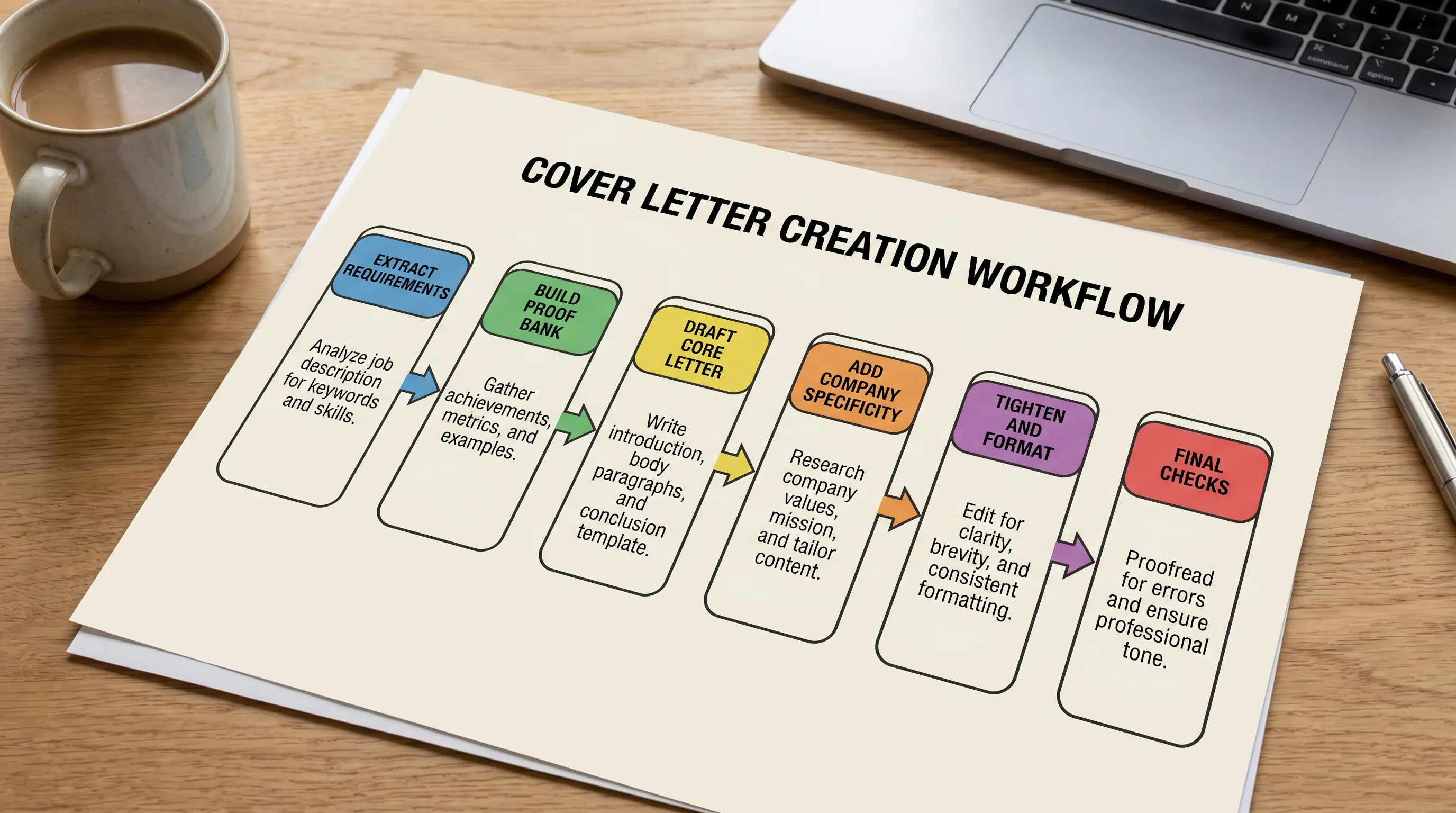
The simple workflow: blank page to done (with a timebox)
Here is the workflow at a glance. The time estimates are realistic for most jobseekers.
| Step | What you do | Time | Output |
|---|---|---|---|
| Extract requirements | Turn the posting into 3 must-hit themes | 5 min | A short “target list” |
| Build your proof bank | Match each theme to one achievement | 10 min | 3 proof bullets |
| Draft the core letter | Write a short, role-specific narrative | 10 min | A complete draft |
| Add specificity | Insert 1 company detail and 1 role detail | 3 min | A tailored draft |
| Tighten and format | Cut fluff, improve scanability, keep ATS-safe | 7 min | A sendable letter |
| Final checks | Read aloud, fix tone, name the file properly | 2 min | Final version |
Total: about 37 minutes the first time, closer to 20 minutes once you’ve done it a few times.
Step 1: Extract the 3 requirements that matter most
Most job posts list 10 to 25 “requirements.” Your cover letter should focus on the 3 that drive hiring decisions.
Look for:
- Repeated phrases (they signal priorities)
- “You will own” responsibilities (they signal outcomes)
- Tools plus context (not just “Salesforce,” but “Salesforce to manage enterprise pipeline”)
Then write your target list as three themes:
- Theme 1 (role outcome): what they need this person to accomplish
- Theme 2 (core skill): the capability that enables it
- Theme 3 (environment): pace, stakeholders, industry, or constraints
Example themes for a Customer Success role:
- Reduce churn and expand accounts
- Build strong stakeholder relationships
- Operate in a fast-moving, metrics-driven team
Step 2: Build a “proof bank” that does not rely on adjectives
Hiring teams do not want “hardworking” or “passionate.” They want evidence.
Create a small proof bank by matching each theme to a specific win. Use a simple pattern:
- Action: what you did
- Scope: for whom, how big, how often
- Result: what changed (metrics if possible)
A quick table makes this easy to see and reuse:
| Job theme | Your proof (one sentence) | Metric to include | Supporting artifact |
|---|---|---|---|
| Reduce churn | Led onboarding redesign for mid-market accounts | Churn %, retention %, time-to-value | QBR deck, onboarding doc |
| Stakeholders | Managed exec relationships across product and finance | Renewal rate, NPS, expansion $ | Renewal notes, customer email |
| Metrics-driven | Built weekly health score tracking | Adoption %, ticket volume, CSAT | Dashboard screenshot (optional) |
If you do not have metrics, use credible proxies:
- “Reduced turnaround from 5 days to 2”
- “Handled 30 to 40 tickets per day”
- “Supported 15 client accounts across three time zones”
Step 3: Draft the letter using a clean, employer-first structure
When you create a cover letter, you are not writing a biography. You are writing a short argument:
- Why this role makes sense for you (in one tight paragraph)
- Proof you can do the work (your best 2 to 3 proof points)
- A clear next step (close confidently and politely)
Use this fill-in template as a starting point:
Hello [Name or Hiring Manager],
I’m applying for the [Role] role at [Company]. I’m excited by [specific company detail tied to the role], and I’d bring [your headline strength] from [your current/recent context].
In my recent work, I’ve delivered outcomes that match what you’re hiring for: [Proof 1 with metric]. I also [Proof 2 with metric]. Most recently, I [Proof 3, optional].
I’d welcome the chance to share how I can help [team/goal] and contribute to [specific outcome]. Thank you for your time and consideration.
Sincerely, [Name]
Keep it short. In 2026, a cover letter that gets read is usually the one that is easy to scan.
Step 4: Add one company-specific line that proves you did your homework
This is the fastest way to stop sounding generic.
Good company-specific details include:
- A product feature you explored
- A customer segment they serve
- A value proposition from their website
- A recent launch or initiative
If you are applying to a company in the relocation or housing services space, for example, referencing the business model and customer promise shows real intent. A platform like Movely positions itself around long-term rentals plus moving and settling-in support, so a strong line might connect your experience to high-trust customer journeys, global operations, or support quality.
One detail is enough. Two is fine. Five looks like you pasted a Wikipedia summary.
Step 5: Tighten the draft (this is where most letters level up)
A good first draft becomes a great cover letter in the edit.
Do a “fluff cut” pass
Remove or rewrite lines that do not add information:
- “I am writing to express my interest in…”
- “I believe I am a great fit…”
- “I am a hardworking, self-motivated professional…”
Replace them with proof or specificity.
Keep formatting simple and ATS-friendly
Unless the employer explicitly asks for a designed letter, stick to a clean layout and export to PDF.
Basic guidelines that are widely accepted (and aligned with standard career-writing advice like the Purdue OWL cover letter guidance):
- One page
- Left-aligned, readable font
- Short paragraphs (2 to 4 lines)
- No tables in the letter itself (tables are fine in your prep notes)
Step 6: Final checks (2 minutes that prevent silly rejections)
Before you send:
- Read it out loud once, you will catch awkward phrasing immediately.
- Check names twice (company name, role title, hiring manager).
- Verify alignment with the resume (same dates, same role titles).
- Name the file clearly:
FirstName_LastName_CoverLetter_Company_Role.pdf.
If you are emailing the letter, your subject line can be plain:
- “Application: [Role] | [Your Name]”
How to use AI to create a cover letter (without sounding like AI)
AI works best when you treat it like a drafting assistant, not a button that replaces thinking.
What to feed the AI
You will get better results if you provide:
- The job description (or key sections)
- Your proof bank (those 2 to 3 achievements)
- The tone you want (confident, warm, formal, direct)
- Any constraints (career change, gap, relocation)
What you still need to do yourself
- Replace generic phrases with your real wording
- Add one company-specific detail
- Confirm facts, numbers, and tools
If your draft sounds too polished in a weird way, it probably needs more concrete detail, like a specific project, a stakeholder group, or a measurable result.
A faster option: generate a first draft in under 30 seconds
If you want to skip the blank-page phase entirely, LetterCraft AI can generate a tailored cover letter draft from a few details.
What makes it useful when you need to move quickly:
- 65+ letter types (so you are not forcing a “cover letter tool” to do everything)
- Multiple tone options
- PDF export
- Letter history tracking (helpful when applying to multiple roles)
- Support for 5 languages
- Free to try, no credit card required
A practical approach is:
- Generate the draft
- Paste in your proof bank metrics
- Add your one company-specific line
- Do the 2-minute final checks
Common reasons cover letters fail (even when the writing is “good”)
Most cover letters do not fail because of grammar. They fail because they are vague.
Watch for these red flags:
- You describe yourself more than you describe outcomes
- You repeat your resume instead of interpreting it
- You never mention the employer’s actual needs
- You use the same opening for every application
If you fix only one thing, fix this: every paragraph should connect to the role.
Frequently Asked Questions
How long should a cover letter be in 2026? Most successful cover letters are one page and easy to scan, usually 200 to 400 words depending on the role.
Do I need to create a cover letter for every job application? Not always. If it is optional, it matters most for competitive roles, career changes, gaps, referrals, and smaller teams where a human reads closely.
Can I reuse the same cover letter? You can reuse the structure, but you should change the proof points and at least one company-specific line. Reusing a fully generic letter is easy to spot.
What should I include if I have little experience? Use proof from internships, class projects, volunteering, or part-time work. Focus on outcomes, scope, and skills you can demonstrate.
Is it okay to use AI to create a cover letter? Yes, as long as the final letter is accurate, specific, and sounds like you. Use AI for speed and structure, then personalize and verify every claim.
Create your cover letter faster with LetterCraft AI
If you are staring at a blank page and want a polished starting point today, try LetterCraft AI at craftmyletter.com. Fill in a few details, choose a tone, and generate a ready-to-edit cover letter draft in about 30 seconds, then export it as a PDF when you are done.