
AI Letter Writer: What It Does and When to Trust It
Learn what an AI letter writer does, when to trust it, and how to review drafts for accuracy, tone, and risk before you send.
An AI letter writer can feel like a cheat code, type a few details, get a polished letter in seconds, hit send. But “fast” is not the same as “trustworthy.” The real skill is knowing what the tool is doing for you (structure, tone, phrasing) and what it cannot reliably guarantee (facts, legal accuracy, policy compliance).
This guide breaks down what an AI letter writer actually does, where it’s safe to rely on it, and how to review drafts so you keep the speed without the risk.
What an AI letter writer actually does (and what it does not)
At its core, an AI letter writer is a text generation system trained to predict and produce natural language. In letter-writing tools, it’s usually guided by:
- The letter type you choose (resignation, cover letter, complaint, appeal, request, etc.)
- The details you provide (names, dates, amounts, context)
- A target tone (firm, friendly, formal, apologetic)
- A proven structure (opening, context, request, next steps, closing)
What it’s good at
An AI letter writer is usually strong at:
- Turning scattered notes into a coherent, professional message
- Matching a requested tone consistently
- Following common business-letter conventions
- Producing multiple variations quickly
What it cannot guarantee
Even strong AI systems can:
- Introduce incorrect facts if your inputs are vague or inconsistent
- Use confident wording that overstates certainty (“You violated the law…”) when you only suspect an issue
- Miss important context (company policy, local law, contract language)
- Sound generic if you do not provide specifics
Think of it less as an “authority” and more as a fast drafting assistant.
AI letter writer vs. template vs. human writer
The most practical way to choose is to match the tool to the stakes.
| Option | Best for | Main downside |
|---|---|---|
| Static template | Simple, repeatable situations | Easy to sound generic, you do the structuring work |
| AI letter writer | Fast personalization, tone control, better flow | Needs fact-checking and judgment |
| Human expert (manager, attorney, HR, editor) | High-stakes, sensitive, regulated situations | Slower and often more expensive |
A useful rule: the higher the consequences of a mistake, the more human review you need.
When an AI letter writer is usually safe to trust
If the letter is mainly about clarity and professionalism (not legal positioning), an AI letter writer can often produce a sendable draft with light editing.
Low-risk, high-value use cases
These situations typically benefit from AI speed and structure:
- Routine workplace communication: meeting follow-ups, simple requests, scheduling, introductions
- Job search letters: cover letter drafts, networking outreach, interview thank-you notes (still personalize heavily)
- Customer service and complaints: requests for refunds, service issues, warranty claims (when facts are clear)
- Tenant and homeowner requests: maintenance requests, repair documentation (stick to facts)
- Apologies and relationship repair: professional apologies, clarifying misunderstandings
In these cases, the AI is mostly helping you be concise, calm, and organized.
When you should not trust an AI letter writer without expert review
Some letters do more than communicate, they create obligations, trigger deadlines, or affect legal rights. AI can still help you draft, but you should treat the output as a starting point, not an answer.
Higher-stakes categories (use AI carefully)
- Legal escalation: demand letters, cease and desist letters, settlement proposals
- Financial disputes: debt settlement terms, billing disputes involving large sums
- Insurance and medical appeals: coverage denials, prior authorization requests (specific evidence matters)
- Immigration and government processes: hardship letters, formal petitions (precision is critical)
- Employment risk: disciplinary responses, harassment complaints, constructive dismissal claims
If you are in one of these scenarios, an AI letter writer can help you avoid a blank page, but you should consider review by an attorney, advocate, union rep, or another qualified professional.
A “trust level” table you can use before hitting send
Use this as a quick decision tool.
| Letter type | Typical risk level | What to verify before sending |
|---|---|---|
| Interview thank-you note | Low | Names, role, specific interview detail |
| Resignation letter (standard) | Low to medium | Last day, notice period, neutral tone |
| Complaint to a company | Medium | Dates, order numbers, specific remedy requested |
| Tenant maintenance request | Medium | Photos/attachments, timeline, clear access availability |
| Insurance appeal | High | Policy language, deadlines, medical codes, evidence |
| Demand letter / legal threat | High | Claims, jurisdiction, wording, strategy, consequences |
The “Trust but Verify” checklist (use this every time)
Before you send an AI-generated letter, run this quick review.
- Facts: Names, dates, addresses, amounts, job titles, and timelines are correct.
- Your goal is explicit: The draft clearly states what you want (refund, meeting, approval, repair, interview, etc.).
- Tone matches the relationship: Firm does not mean hostile, friendly does not mean vague.
- No accidental admissions: Remove lines that accept blame you do not intend to accept.
- No overconfident legal claims: Avoid asserting laws or violations unless you are certain.
- One clear next step: A deadline, proposed time, or specific action the recipient can take.
- Plain-English readability: If you would not say it out loud, rewrite it.
That checklist is the difference between “AI wrote it for me” and “AI helped me write it well.”
How to get better results from an AI letter writer
Most disappointing outputs come from thin inputs. If you want a draft you can trust faster, provide structured details.
Give the AI the right raw material
Include:
- Who you are and who the recipient is (and the relationship)
- The situation in 2 to 4 factual sentences
- The outcome you want, stated in one line
- Any constraints (word limit, deadline, no legal threats, no emotion)
- A tone choice (professional, firm, empathetic, neutral)
Add “must include” and “must avoid” lines
A simple trick: tell the tool what it must include and what it must not include.
Examples:
- Must include: “My last day will be May 15, 2026.”
- Must avoid: blaming language, sarcasm, legal threats
This reduces the chance of the AI wandering into risky phrasing.
A note for businesses: letters are brand assets, not just admin
For teams sending outreach, partnership requests, client updates, or vendor escalation emails, letters directly affect trust and conversions. Many companies pair AI drafting with brand and channel strategy so messaging stays consistent across email, proposals, and landing pages.
If you are building that end-to-end system (ads, SEO, conversion copy, and the outreach that supports it), it can help to look at how a Singapore-based digital marketing agency approaches conversion-focused messaging and testing, then apply the same discipline to your business letters: clear offer, proof, next step.
Privacy and sensitive data: what not to paste into AI
Even when a tool is designed for letter creation, you should be intentional about what you share.
Avoid including:
- Full Social Security numbers or government ID numbers
- Bank account details
- Full medical records
- Passwords, one-time codes, or security answers
When possible, replace sensitive identifiers with placeholders while drafting, then insert them locally at the final step.
If you are evaluating any AI writing tool, look for clear privacy terms, data handling practices, and whether you can delete letter history.
Using LetterCraft AI as a practical example
Purpose-built tools are often easier to trust than a generic chat tool because they constrain the format and guide you through the right inputs.
With LetterCraft AI, you can generate letters for 65+ letter types by filling in a few details and selecting a tone. It supports multiple tone options, PDF export, copy to clipboard, letter history tracking, and 5 languages. It’s also free to try with no credit card required, with simple pricing tiers and a one-time pricing approach (no subscriptions).
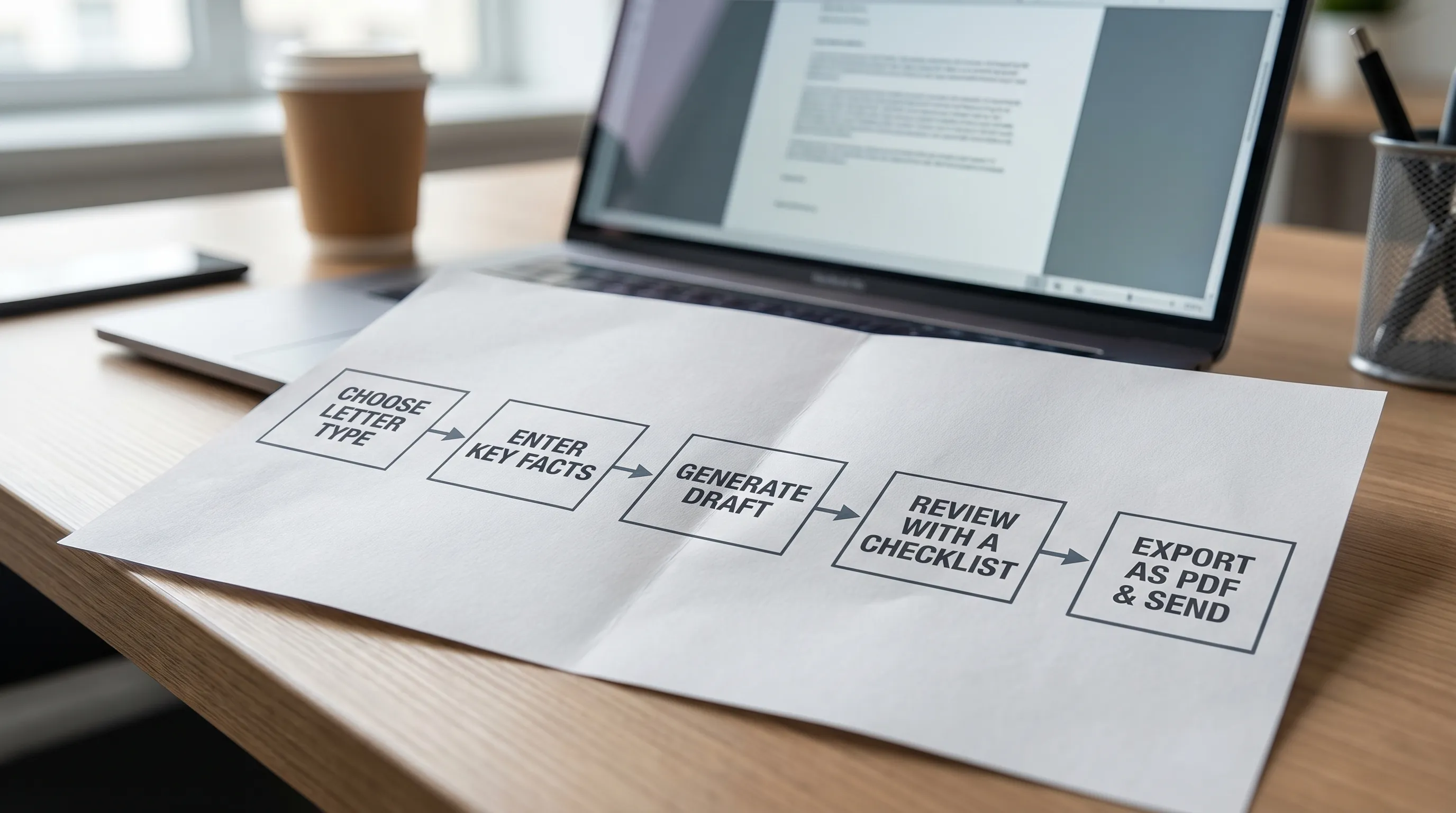
A reliable workflow looks like this:
- Choose the closest letter type (do not force a resignation template to become a legal notice).
- Provide factual, complete inputs.
- Generate 2 drafts in different tones (for example, neutral vs. firm).
- Apply the checklist above.
- Export to PDF if you need a formal attachment, otherwise send as an email.
Common red flags that mean “edit this before you trust it”
AI drafts often need extra care when you see:
- Vague intensity: “This has caused significant harm” without specifics.
- Unrealistic promises: “I guarantee results” or “I will be available anytime.”
- Legal-sounding threats: “I will pursue all legal remedies” when you do not intend to.
- Overlong backstory: A full narrative where a concise timeline would be stronger.
- Empty filler: “I am passionate and hardworking” with no proof.
If you cut these and replace them with facts, you usually end up with a letter that feels human and credible.
Frequently Asked Questions
Is an AI letter writer trustworthy? It’s trustworthy for structure, tone, and drafting speed, but you should always verify facts and remove risky claims, especially in high-stakes letters.
Can employers tell if I used an AI letter writer? They may notice generic phrasing. If you add specific details, real achievements, and a natural voice, the letter typically reads like a strong human draft.
Should I use an AI letter writer for legal letters? Use it to create a draft, but do not rely on it for legal accuracy. For demand letters, settlements, or anything involving rights and deadlines, consider expert review.
What should I include to get a better AI-generated letter? Provide names, dates, a short factual timeline, the exact outcome you want, and a tone preference. Add “must include” and “must avoid” instructions.
What’s the biggest mistake people make with AI-generated letters? Sending the first draft without checking facts and tone. A 2-minute review prevents most issues.
Generate a professional letter in under 30 seconds
If you want a fast draft you can confidently edit and send, try LetterCraft AI. Pick a letter type, enter a few details, choose a tone, and generate a polished letter quickly.
Get started at craftmyletter.com.